


Windows 11 version 26H2 — the Windows 11 2026 Update — reached general availability on September 29, 2026, and it is one of the smoothest feature updates Microsoft has ever shipped. If your PC is already on the current servicing branch, 26H2 arrives as a tiny enablement package (KB5121794) that simply switches on features already staged on your system, so the whole thing finishes with a single restart.
There is just one catch: Microsoft rolls it out in waves, and a huge number of eligible PCs keep showing “You’re up to date” in Windows Update with no 26H2 anywhere in sight. If that is happening to you, you are not alone — and in most cases nothing is actually broken.
I have been through this exact situation with every Windows 11 feature update, and I will walk you through why 26H2 is hiding and the 7 fixes that actually make it appear. Work through them in order — most people are fixed by number 2 or 3.
Why Windows 11 26H2 Isn’t Showing Up
Before fixing anything, it helps to know what is most likely blocking the offer. Microsoft only offers 26H2 when all of its internal checks pass, and these are the usual culprits:
- Phased rollout. Microsoft releases feature updates in stages. Two identical PCs can be offered the update days or weeks apart — your device may simply not be in the current wave yet.
- The early-updates toggle is off. The “Get the latest updates as soon as they’re available” switch is how Microsoft picks who gets 26H2 first. With it off, you wait longer.
- A safeguard hold on your device. If Microsoft detects a known driver, app, or hardware compatibility problem, it temporarily blocks the offer on that device until the issue is resolved.
- Paused updates or a metered connection. If updates are paused — or your connection is set as metered — Windows Update will not offer feature updates at all.
- You are on an older build. 26H2’s enablement package only applies to PCs running Windows 11 24H2 or 25H2. Anything older is not in the upgrade path.
- Stuck Windows Update components. Sometimes the update service itself is jammed — a corrupted cache or a stuck service means no new offers ever appear.
7 Fixes That Actually Work
Go through these one at a time, checking Windows Update after each step to see if 26H2 appears.
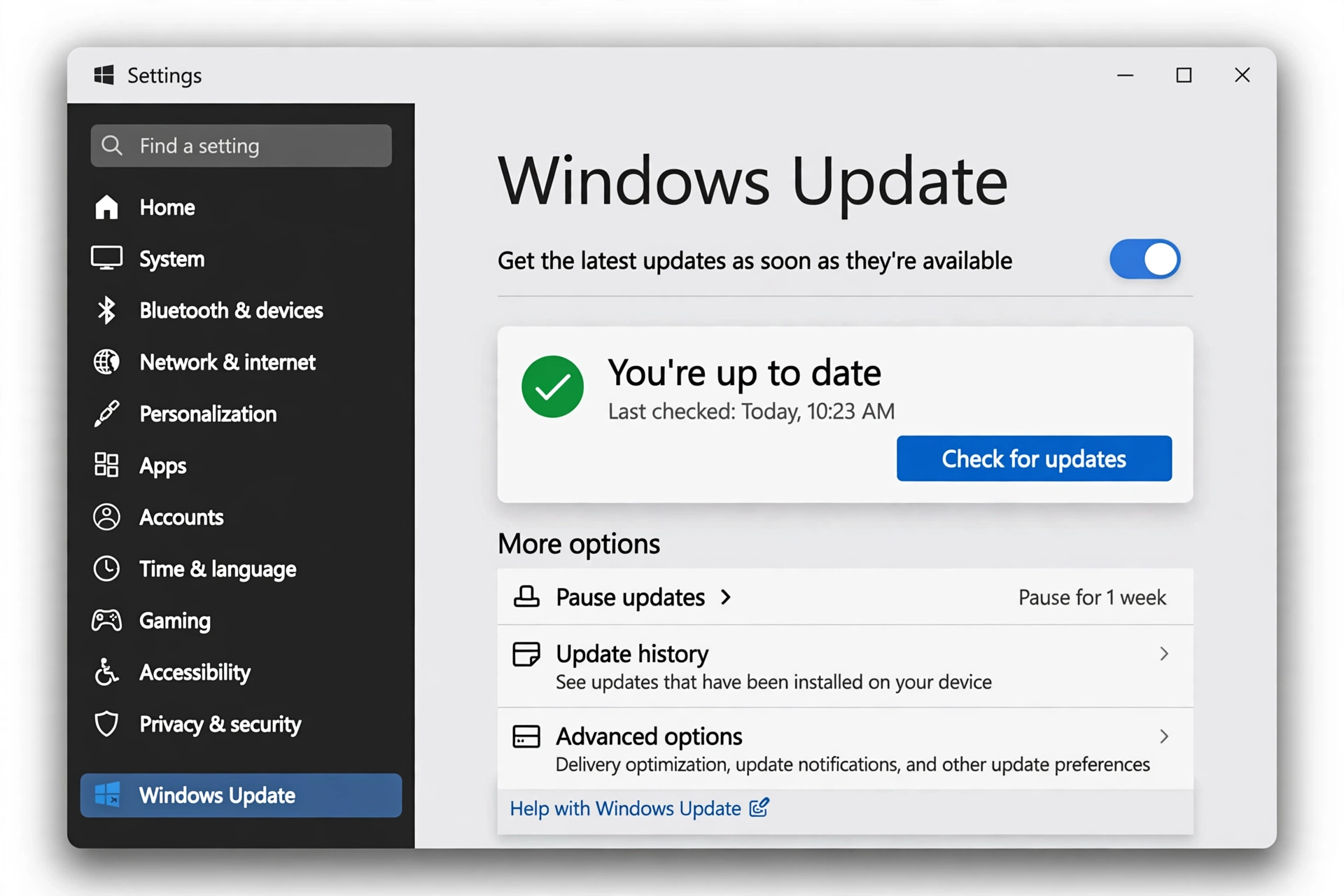
Fix 1: Turn On “Get the Latest Updates as Soon as They’re Available”
This single toggle is the number-one reason people miss the 26H2 wave. Microsoft has said plainly that eligible devices with this option turned on get the update first.
- Open Settings and go to Windows Update.
- Find Get the latest updates as soon as they’re available and switch it On.
- Click Check for updates.
Give it a minute to scan. If 26H2 is ready for your device, you will see “Windows 11, version 26H2 is available” — click Download & install and restart when prompted.
Fix 2: Run the Windows Update Troubleshooter
If the toggle was already on, the next most likely problem is the update service itself. Windows has a built-in troubleshooter that finds and fixes the common issues automatically, and it is surprisingly good.
- Open Settings and go to System > Troubleshoot.
- Click Other troubleshooters.
- Next to Windows Update, click Run.
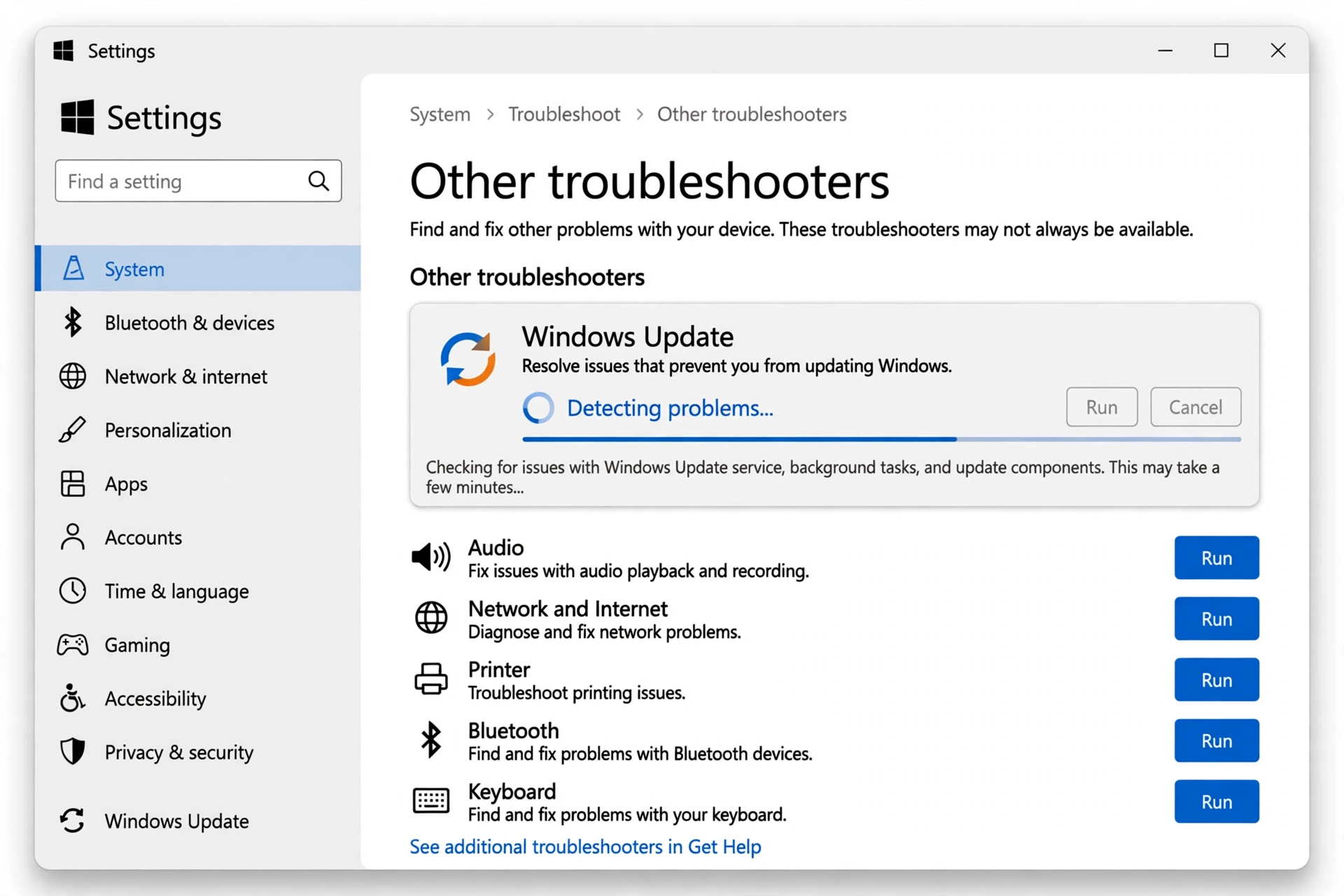
Let it finish and apply any fixes it suggests, then go back to Settings > Windows Update and click Check for updates again.
Fix 3: Reset Windows Update Components
When the troubleshooter does not clear the jam, the next level is a manual reset of the Windows Update components. This clears the corrupted download cache that can silently stop new offers from appearing. It sounds technical, but it is just a few commands — I do this on my own PCs regularly.
Open the Start menu, type cmd, right-click Command Prompt, and choose Run as administrator. Then run these commands one by one:
net stop wuauserv
net stop cryptSvc
net stop bits
net stop msiserver
ren C:\Windows\SoftwareDistribution SoftwareDistribution.old
ren C:\Windows\System32\catroot2 catroot2.old
net start wuauserv
net start cryptSvc
net start bits
net start msiserver
What this does is stop the update services, rename the old (possibly corrupted) update cache folders so Windows builds fresh ones, and restart the services. Close Command Prompt, restart your PC, and check for updates again.
Fix 4: Install the KB5121794 Enablement Package Manually
Since 26H2 is delivered as an enablement package — a small switch that activates features already on your PC — you can install that package yourself instead of waiting for the offer. The package is KB5121794.
First, make sure you have the September 22, 2026 optional update KB5124010 or a later monthly update installed, since 26H2 support was added on top of it. Then:
- Go to the Microsoft Update Catalog website and search for KB5121794.
- Download the version matching your system (x64 for most PCs).
- Run the downloaded file and follow the prompts, then restart once.
You can read Microsoft’s own documentation for the September servicing update that 26H2 builds on here:
Microsoft’s KB5124010 support page for Windows 11 24H2 and 25H2
After the restart, your PC should be on 26H2 — verify with the check in the next section.
Fix 5: Make Sure Your PC Meets the Requirements
Windows Update will never offer 26H2 to a device that is not eligible, and eligibility has two parts. First, your PC must already be running Windows 11 24H2 or 25H2 — press Windows + R, type winver, and check. If you are on 23H2 or older (or Windows 10), you need to move to a supported build first. Second, the standard Windows 11 hardware requirements still apply (TPM 2.0, Secure Boot, a supported CPU).
Not sure where your PC stands on the newer hardware and AI-ready requirements? This guide walks you through the check step by step:
How to Check If Your PC Meets the Latest Windows 11 Requirements
Fix 6: Look for a Safeguard Hold or a Blocking Driver/App
If everything above is fine but 26H2 still does not show, Microsoft may have placed a safeguard hold on your device — a temporary block because of a known compatibility issue with a driver, app, or piece of hardware. You cannot (and should not) bypass a safeguard hold; it lifts automatically once Microsoft resolves the issue.
What you can do is remove the things most likely to be holding you back:
- Update your drivers — especially graphics, Wi-Fi/Bluetooth, and storage drivers — from your PC manufacturer’s support site, not just Windows Update.
- Uninstall any apps you do not use, particularly old utilities, antivirus software, and driver tools.
- Disconnect unnecessary peripherals (USB printers, docks, external drives) during the update check.
If you get 26H2 offered and then the installation itself fails, that is a different problem with its own set of fixes — this detailed walkthrough covers the install-failure side specifically:
Why Windows 11 26H2 Keeps Failing to Install — and How to Fix It (TechDows)
Fix 7: Use the Installation Assistant or ISO as a Last Resort
If you have worked through fixes 1–6 and 26H2 still is not being offered, you can go around Windows Update entirely with Microsoft’s Windows 11 Installation Assistant or the official 26H2 ISO. Download either from Microsoft’s Windows 11 download page, run it, and choose to upgrade your current installation — your files and apps stay put.
Two warnings before you do this: back up your important files first (an external drive or cloud backup takes minutes and saves heartbreak), and only use the ISO/Assistant route if your PC is genuinely eligible — forcing an upgrade on unsupported hardware causes more trouble than it fixes.
If the Installation Assistant itself refuses to cooperate, start with this troubleshooting guide before trying again:
Fix Windows 11 Installation Assistant Not Working
How to Confirm You’re on 26H2
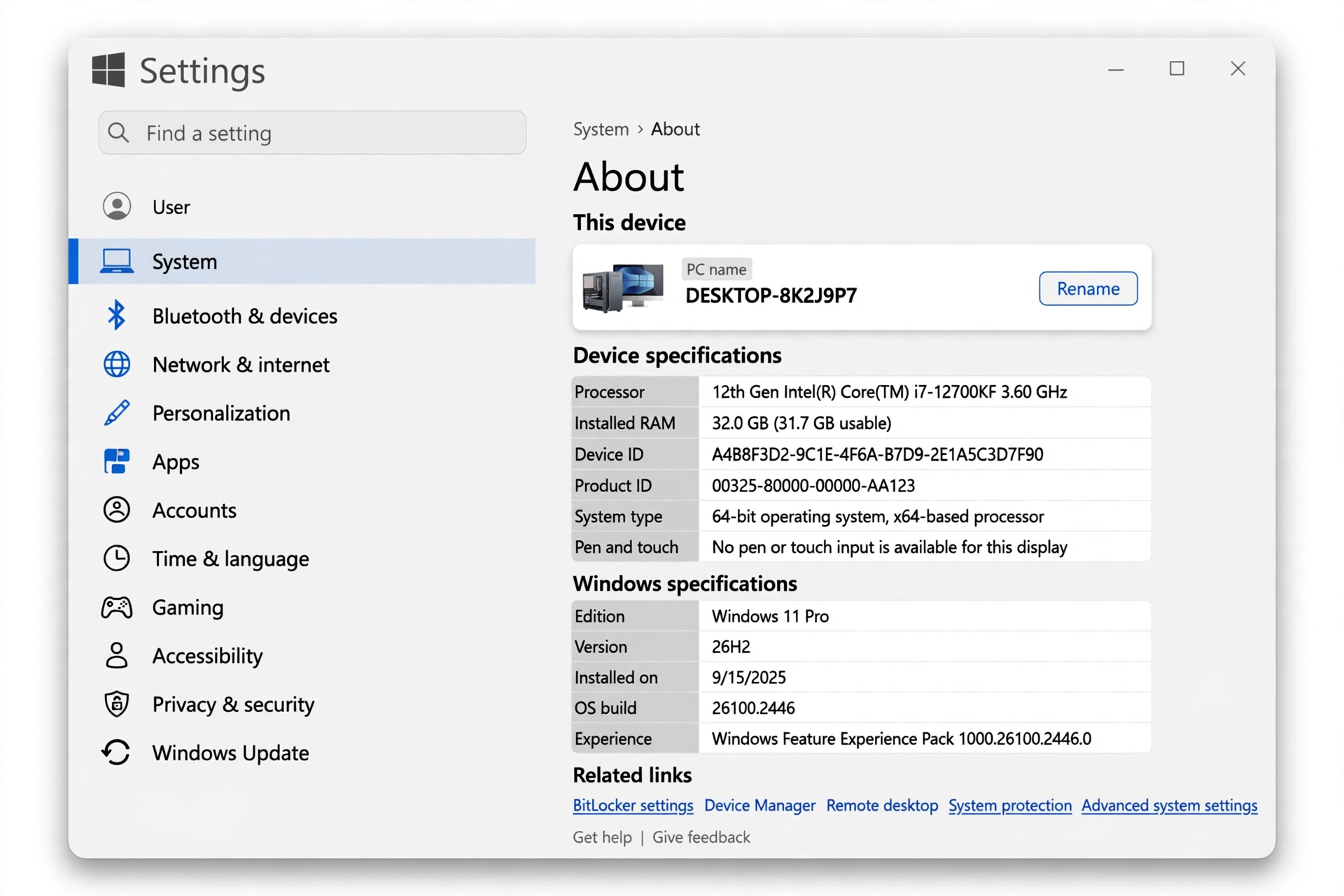
After any of these fixes, confirm the upgrade actually landed. Press Windows + R, type winver, and hit Enter — the About Windows box should say Version 26H2. You can also check Settings > System > About and look at the Version line under Windows specifications.
One more heads-up: if your PC feels slower after the update lands, do not panic — post-update sluggishness is common while everything settles, and this guide covers the fixes:
Fix Windows 11 Running Slow After an Update
Frequently Asked Questions
Is Windows 11 26H2 free?
Yes. 26H2 is a free feature update for licensed Windows 11 devices. If your PC is eligible, you will not be asked to pay — it comes through Windows Update, the enablement package, or the Installation Assistant at no cost.
How long does the 26H2 update take to install?
Not long at all for most people. Because 24H2, 25H2, and 26H2 share the same servicing branch, the enablement package only flips on features that are already staged — typically one download of a few minutes and a single restart.
Why does Windows Update say “You’re up to date” but 26H2 is not showing?
That message just means no updates are currently offered to your device. The usual reasons are the phased rollout (your wave has not arrived), the early-updates toggle being off, a safeguard hold, paused updates, or stuck update components — all covered in the fixes above.
Can I force-install 26H2 with the KB5121794 enablement package?
Yes, if your PC is on 24H2 or 25H2 with the required servicing update installed. Download KB5121794 from the Microsoft Update Catalog and run it manually. Just do not use it to jump from an older version or unsupported hardware.
Will upgrading to 26H2 delete my files?
No. The 26H2 enablement package, the Installation Assistant upgrade, and the ISO upgrade path all preserve your files, apps, and settings. That said, always back up before any feature update — drives fail at the worst possible moment, and a backup takes minutes.
Final Words
Windows 11 26H2 not showing up in Windows Update is frustrating, but it is rarely a real problem — in most cases it is the phased rollout, a missed toggle, or a jammed update service. Turn on “Get the latest updates as soon as they’re available”, run the troubleshooter, and reset the update components, and the offer usually appears on its own.
If you are in a hurry or your device seems held back, the KB5121794 enablement package or the Installation Assistant gets you there today — just back up first and make sure your PC is genuinely eligible. Let me know in the comments which fix worked for you.
