

Finding an entry-level FDM 3D printer that blends ultra-fast printing speeds with true plug-and-play reliability can be challenging. When evaluating bambu lab a1 3d printer reviews, it becomes clear that Bambu Lab engineered the A1 to bring flagship CoreXY automation—such as active flow compensation, fully automated bed leveling, and multi-color capability via the AMS Lite—into an accessible, open-frame bed-slinger format.
Whether you are a beginner looking for a hassle-free setup or an experienced maker seeking high-speed production without constant manual tuning, this comprehensive review breaks down everything you need to know about the Bambu Lab A1.
Bambu Lab A1 Desktop Setup. Source: Getty Images
Technical Specifications Overview
| Feature / Hardware Spec | Specification Details |
|---|---|
| Build Volume | 256 x 256 x 256 mm (10 x 10 x 10 inches) |
| Max Toolhead Speed | Up to 500 mm/s (Acceleration: 10,000 mm/s²) |
| Motion System | All-metal linear rails on X and Z axes, heavy-duty Y-axis guide |
| Hotend & Nozzle | All-metal hotend with toolless quick-swap system (280°C max temp) |
| Multi-Color Support | AMS Lite compatible (4-spool automatic filament system) |
| Sensors & Calibration | Active flow compensation, automatic mesh leveling, vibration resonance calibration |
| Display & Connectivity | 3.5-inch IPS color touchscreen, Wi-Fi, Bambu Handy app, Bambu Studio |
1. Build Quality, Motion Architecture, and Safety Updates
The Bambu Lab A1 stands out among traditional bed-slingers thanks to its rigid construction and refined linear rail assembly. Featuring all-metal rails on the X and Z axes along with a wide aluminum base, it minimizes frame flex during high-acceleration print moves. Many content creators recording their setup videos with gear highlighted in a Sony ZV-E10 Review appreciate the clean, compact aesthetics of the printer on camera.
Bambu Lab A1 paired with AMS Lite. Source: Electrobes
Heatbed Cable Recall and Engineering Fixes
Early production runs of the Bambu Lab A1 encountered a major manufacturer recall due to heatbed cable strain issues, where sharp bends or transit stress could damage internal wiring. Bambu Lab subsequently redesigned the heatbed assembly with a heavy-duty strain relief boot, an upgraded cable housing, and reinforced internal shielding. Revised production units ship with these safety enhancements pre-installed, fully restoring long-term electrical reliability.
2. Speed, Active Flow Compensation, and Calibration
While many budget printers claim speeds up to 500 mm/s, print quality often suffers from ringing, ghosting, or under-extrusion. The A1 addresses these mechanical limits through advanced real-time sensor processing.
- Vibration Compensation (Input Shaping): Built-in accelerometers measure the structural resonance of both the toolhead and the heatbed before printing, canceling out ghosting artifacts on surface walls.
- Active Flow Compensation: Utilizing an eddy-current sensor built directly into the hotend, the controller measures pressure in the nozzle tip to adjust filament flow dynamically, eliminating blobbed corners and uneven layer lines.
- Auto Bed Leveling & Z-Offset: The nozzle probes the textured PEI plate physically, eliminating manual paper-friction checks or manual bed-knob adjustments. Applying essential Beaconsoft Tips for Tech strategies—such as keeping PEI plates clean with isopropyl alcohol—ensures first-layer adhesion stays flawless.
3. Toolless Quick-Swap Hotend and Extrusion System
Upgrading or replacing nozzles on traditional 3D printers often requires heated wrenches, delicate wiring harnesses, and risk of heat-break damage. The Bambu Lab A1 introduces a magnetic quick-swap toolhead design.
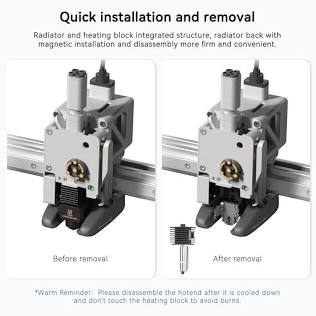
Toolless Quick-Swap Hotend System. Source: Vertex 3D
Seamless Nozzle Changes
To swap between nozzle sizes (0.2mm for fine miniature detail up to 0.8mm for high-volume functional parts), you simply open the front clip, detach the magnetic silicone sock assembly, and pull the nozzle out—no tools or hot-tightening required. The direct-drive hardened steel extruder gears handle soft PLA, flexible TPU, and abrasive PETG without slipping or chewing filament.
4. Multi-Color Printing: AMS Lite Efficiency and Waste Metrics
Pairing the Bambu Lab A1 with the AMS Lite enables seamless 4-color multi-material printing. Unlike enclosed AMS units designed for CoreXY machines, the AMS Lite uses an open rotary spindle architecture that accepts diverse spool sizes and cardboard rims easily. Designers who organize 3D model files on portable devices, often mentioned in Samsung Galaxy Tab S9 FE Reviews, find monitoring multi-color sliced builds via mobile apps very convenient.
Filament Purge and Poop Management
During multi-color prints, the toolhead automatically retracts filament and purges excess material into a dedicated wipe spring mechanism on the left rail. While multi-color prints naturally generate filament purge waste (“poop”), optimizing Bambu Studio slicer settings—such as flushing into object infill or reducing flush multipliers—reduces material consumption by up to 40%.
5. Mid-Range 3D Printer Competitor Comparison
Evaluating key feature sets shows how the Bambu Lab A1 compares against popular market alternatives:
| Feature | Bambu Lab A1 | Creality Ender 3 V3 | Prusa MINI+ |
|---|---|---|---|
| Build Volume | 256 x 256 x 256 mm | 220 x 220 x 250 mm | 180 x 180 x 180 mm |
| Max Speed | 500 mm/s | 600 mm/s | 200 mm/s |
| Multi-Color Support | Native (AMS Lite – 4 Color) | Optional (Separate kit) | No Native Option |
| Nozzle System | Toolless Quick-Swap | Standard Threaded | Standard Threaded |
| Bed Leveling | Fully Automated Eddy-Current | Auto-Leveling Probe | SuperPINDA Probe |
| Enclosure Friendly | Open Frame Only | Open Frame Only | Open Frame Only |
6. Critical Limitations Most Reviews Overlook
Despite its impressive features, prospective buyers should account for these operational trade-offs:
- Enclosure Restrictions: Because the A1 relies on passive cooling and an open frame, printing high-temp engineering thermoplastics (like ABS, ASA, or Polycarbonate) leads to severe bed warping and layer separation.
- AMS Lite Footprint: The open AMS Lite feeder requires significant desk clearance alongside or mounted above the printer frame.
- Cloud Dependency: Advanced camera monitoring and push notifications operate best through Bambu Cloud services, though LAN-only mode remains available for privacy-focused workflows.
Conclusion
Aggregating detailed bambu lab a1 3d printer reviews confirms that Bambu Lab has reshaped user expectations for budget bed-slingers. By combining high acceleration, intelligent flow calibration, toolless hotend swaps, and accessible multi-color printing through the AMS Lite, the Bambu Lab A1 provides an unrivaled mix of speed and reliability for hobbyists and professionals alike.
Frequently Asked Questions (FAQs)
Q1: Is the heatbed cable issue on the Bambu Lab A1 completely resolved?
Yes, all newly manufactured Bambu Lab A1 units ship with redesigned heatbed cables, upgraded strain reliefs, and reinforced protective housing.
Q2: Can the Bambu Lab A1 print flexible TPU filament with the AMS Lite?
No, flexible TPU must be fed directly from the side spool holder because soft filaments tangle inside the AMS Lite PTFE tubes.
Q3: How long does it take to assemble the Bambu Lab A1 out of the box?
The A1 comes partially pre-assembled and typically takes around 20 to 30 minutes to bolt together and run initial auto-calibration routines.
Q4: Does the Bambu Lab A1 require manual bed leveling?
No, the printer features fully automated nozzle probing and active mesh leveling, eliminating the need for manual bed knobs or manual paper adjustments.
Q5: Can the Bambu Lab A1 print ABS or ASA materials effectively?
No, the open-frame design lacks an enclosed heated chamber, making high-temperature materials like ABS and ASA prone to warping during prints.
Source: Tricks Mode
